×
Download Easybook App For More Discounts!
Scan Me!
Loading...
Toggle navigation
ລົງຊື່ເຂົ້າໃຊ້
ເຂົ້າສູ່ລະບົບ
ລົງທະບຽນ
ຄົ້ນຫາລ່າສຸດ
Singapore
Malaysia
Indonesia
Thailand
Vietnam
Myanmar
Cambodia
Laos
Brunei
Philippines
ສະກຸນເງີນ
USD
ໂດຣາສະຫະລັດ
SGD
ໂດຣາສີງກະໂປ
RM
ລີງກິມາເລເຊຍ
IDR
ຣູເປຍ
THB
ບາດ
VND
ຫວຽດນາມດົງ
MMK
ຈັຕມ້ຽນມາ
CNY
ຢວນຈີນ
LAK
ລາວກີບ
PHP
ເປໂຊຟີລິບປີນ
Language
ພາສາລາວ
English
中文
ຕິດຕໍ່ເຮົາ
Pages
ໂປໂມຊັນ
ຂ່າວສານລ່າສຸດ
ວິທີການຈອງ
Become Our Supplier
ເປັນສາຂາ ຫຼື ຕົວແທນຂອງເຮົາ
ເວັບໄຊພັນທະມິດ
ປີ້ລົດໂດຍສານ
ຜູ້ໃຫ້ບໍລີການລົດໂດຍສານ
ສະຖານີລົດໂດຍສານ
ປີ້ລົດໄຟ
ຜູ້ປະກອບການລົດໄຟ
ສະຖານີລົດໄຟ
ປີ້ເຮືອ
ຜູ້ປະກອບການເຮືອ
ທ່າເຮຶອ
ລົດເຊົ່າ
ທ່ອງທ່ຽວ
ໂຮງແຮມ
ລົດເຊົ່າເໝົາ
ຄຳຖາມທີ່ພົບເລື່ອຍໆ (FAQ)
ກ່ຽວກັບ Easybook
ຕິດຕໍ່ພວກເຮົາ
ແຜນທີເວັບໄຊ
ລີ່ງທີ່ມີປະໂຫຍດ
ນະໂຍບາຍປົກປ້ອງຄວາມເປັນສ່ວນຕົວສຳລັບຜູ້ໃຊ້ງານເວັບໄຊ
ເງື່ອນໄຂການໃຊ້ງານ
ສົນໃຈລົງໂຄສະນາ
ບັດສ່ວນຫຼຸດ
|
LA
Easy steps to make payment via Paypal
Home
Easy steps to make payment via Paypal
A simple & helpful step by step guide on how to make payment via Paypal.
Step 1 - Search Your Trips & Choose Seat(s)
Select your Origin, Destination, Departure Date, Departure Time and etc. Click
"Search for Buses"
.
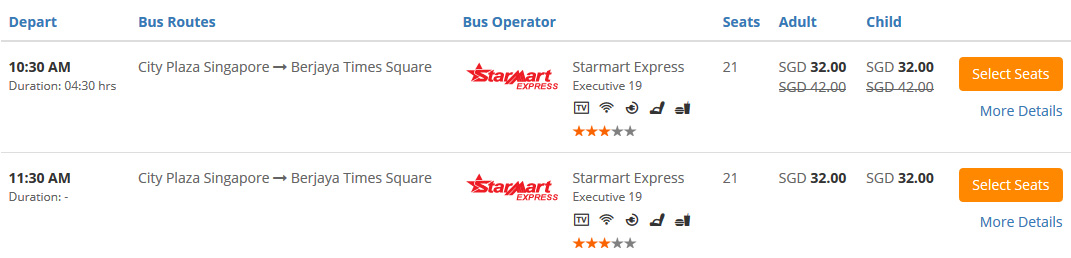
Select your desired trip. Click
"Select Seats"
Choose your desired seat(s).
Click
"Continue"
(If you book 1 way trip). Click
"Go to Returning Trips"
(If you book round trip).
Step 2 - Fill In Details & Pay
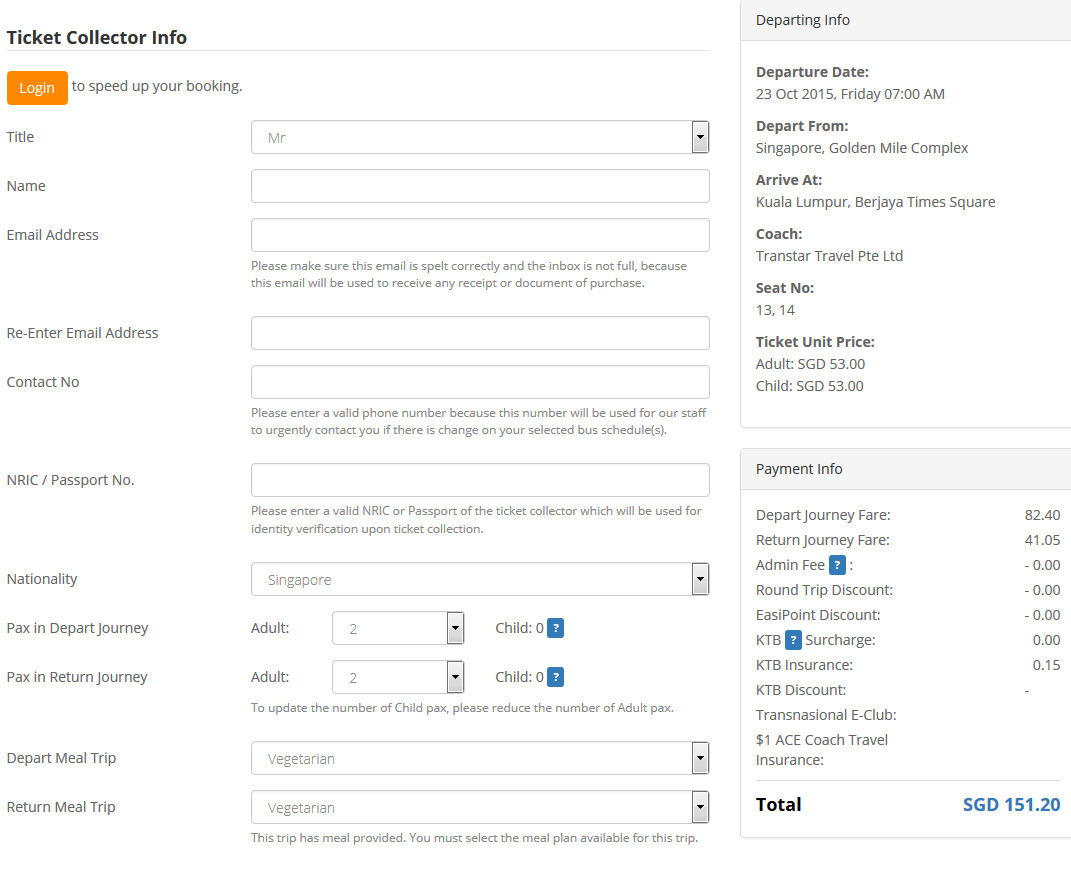
Fill in the
Ticket Collector Info
Double check the
Journey & Payment Details
.
Key in the
Discount Code
if you have one, click
"Apply Code"
.
Select Paypal payment option.
Remember to tick to agree to Easybook's
Ticketing Policy
.
Click
"Pay Now"
.
You will be prompted to confirm your total number of tickets and total amount that you are going to pay are correct. Click
"OK"
and proceed.
You will come to Paypal payment page.
Double check your booking summary. (You will be charged 1.5% + SGD 0.50 as a processing fee).
Fill in all the details.
Click
"Pay"
Upon payment sucessful, an Order Summary will be sent to your email automatically.
You are required to show the Order Summary when boarding. (You may print it out or show through mobile phone)
Global Site:
ເຮົາຍອມຮັບ:
SGD
RM
IDR
THB
VND
USD
RMB
MMK
BND
CNY
LAK
ສະມາຊີກຂອງ:
* ລາຄາສູງກວ່າຂາຍທີ່ເຄົາເຕີເລັກນ້ອຍພຽງ 0.01% ເອງ.
** ໃຊ້ໄດ້ສຳລັບການເຮັດທຸລະການໂດຍບໍ່ຕ້ອງໃຊ້ລະຫັດສ່ວນຫຼຸດ ແລະ ເສັ້ນທາງທີ່ສະເໜີໃຫ້ໂດຍບໍລິສັດບາງບໍລີສັດເທົ່ານັ້ນ.
*** ໃຊ້ໄດ້ສະເພາະບາງເສັ້ນທາງເທົ່ານັ້ນ, ສ່ວນຫຼຸດຕ່າງໆໄດ້ລວມໄປທີລາຄາປີ້ຮຽກຮ້ອຍແລ້ວ (ເຊັນລາຄາຕໍ່າກວ່າລາຄາທີຂາຍຢູ່ເຄົາເຕີ).
* ພາບລົດເປັນພຽງຮູບເພື່ອໃຊ້ໃນການອ້າງອີງເທົ່ານັ້ນ.
* ເວລາການເດີນທາງເປັນພຽງການຄາດຄະເນເທົ່ານັ້ນ.